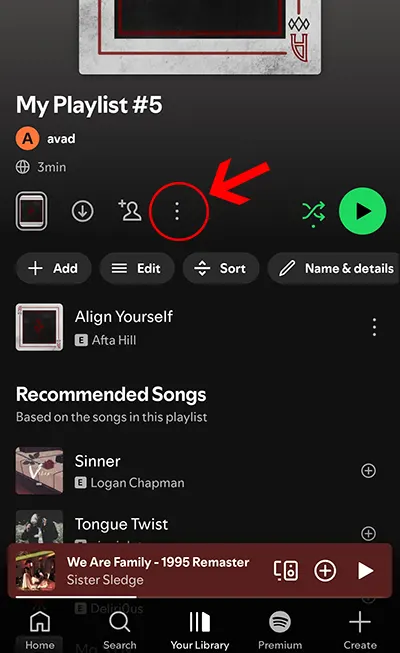
Step 1
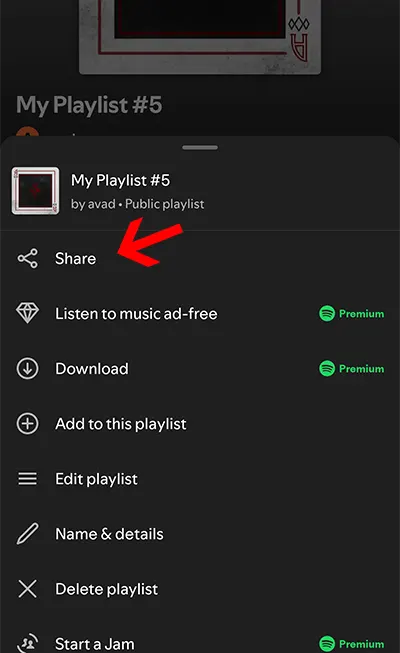
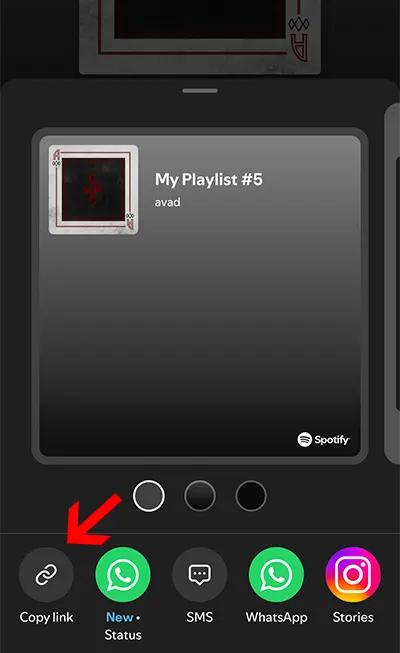
Copy the Spotify link
Open Spotify, copy a playlist, album, or track link from the Share menu.
Spotify is a trademark of Spotify AB. Spotisaver is a service and is not affiliated with, endorsed by, sponsored by, or associated with Spotify AB.
Load album metadata, review the tracklist, and create personal MP3 files or one ZIP archive from matching independent external sources where available.
Spotisaver is an independent playlist metadata and MP3 backup tool. Paste a playlist, album, or track link to read metadata, find matching audio from independent external sources where available, and create MP3 files or ZIP archives for personal use.
Spotify links are used only to identify metadata such as track title, artist, album, cover art, release date, and playlist structure. Spotisaver does not download, rip, record, or access audio from Spotify, and it is not affiliated with Spotify AB.
You can download individual matched tracks, create ZIP archives for playlists and albums, or export your track list to TXT. Users must only back up content they have the legal right to copy.
Read an album tracklist from its link and save matched MP3 files from independent external sources.
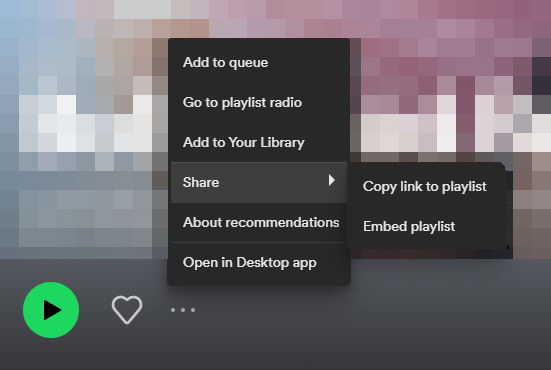
Open Spotify, copy a playlist, album, or track link from the Share menu.
Paste the link above and click Load. Spotisaver reads metadata and searches for matching audio from independent external sources where available.
Download matched MP3 files, create a ZIP archive, or export TXT. Use backups only for content you have the legal right to copy.
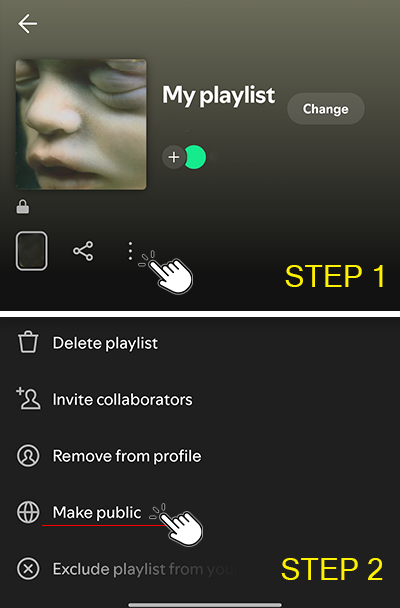
If you get a private playlist error, switch the playlist visibility to public and try loading it again.
After changing visibility, wait about a minute and click Load again.
Spotisaver combines Spotify link processing with practical MP3 backup tools for playlists, albums, and tracks. It is built for metadata-first workflows and personal archive preparation from independent external sources where available.
Key capabilities include matched track downloads, full playlist or album ZIP creation, and TXT export for clean tracklist management. Available metadata such as title, artist, album, cover art, and release date is preserved in the backup workflow.
The service runs fully in the browser, requires no installation, and does not require Spotify login credentials. Spotisaver does not download, rip, record, or access audio from Spotify.
Use Spotisaver only for personal backups and only for content you have the legal right to copy.
Premium did not activate - what should I do? I did not receive an email after payment.
Please check your Spam/Junk folder. If you paid with PayPal, check the email address linked to your PayPal account.
If our emails aren't reaching you or you didn't receive the authorization code, please contact us; email is preferred and we will reply as soon as possible.
If you still need help, email us or contact support.
Important: Spotisaver is independent and not affiliated with Spotify. Spotify links are used only for user provided metadata identification. We do not download, rip, record, or access audio from Spotify. Users must only back up content they have the legal right to copy.
Spotisaver is not a Spotify ripper and does not download or record audio from Spotify. It works with user provided Spotify links to read metadata and search for matching audio from independent external sources where available.
No. Spotisaver does not access, rip, record, extract, stream, or download audio from Spotify. Spotify links are used only to identify track metadata such as title, artist, album, cover art, and release date.
No. Spotisaver is an independent tool and is not affiliated with, endorsed by, sponsored by, or associated with Spotify AB.